Stripe Fees
What it costs to take a card or bank payment in Rotor, why American Express is different, and the fees that only show up on international cards and disputes.
Written By Sean
Last updated 24 days ago
Processing Fees
Every card or bank payment taken through Rotor carries a processing fee. It is deducted from the payment before the money reaches your bank account — you never invoice a customer for it unless it is added on as a surcharge, and you never get billed for it separately.
Card rates are the same in the United States (USD) and Canada (CAD). Bank payment rates differ between the two — both are below. All rates on this page are Subject to Change.
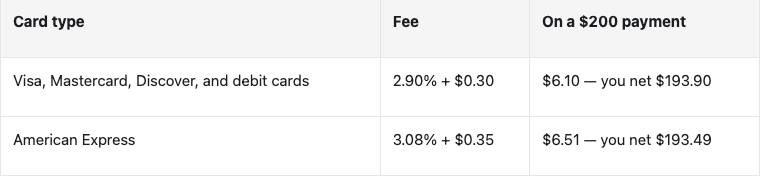
What You Pay Per Transaction
Why AMEX costs more. American Express sets its own rates, and they are higher than the other card networks. An AMEX payment therefore costs a little more to accept — about 23¢ more on a $100 payment, 41¢ more on $200.
Bank payments
Taking payment straight from a customer’s bank account costs less than a card at every amount, and the gap widens as the invoice grows. The fee comes out of the payout exactly the way a card fee does.
United States — bank account (ACH)
1.4% of the payment. Part of the fee is capped, so the effective rate falls on larger payments:
$100 → $1.40
$500 → $7.00
$2,000 → $19.00 (0.95%)
$5,000 → $40.00 (0.80%)
Canada — bank account (pre-authorized debit)
$0.40 plus 0.8% of the payment, and a little less on very large payments, where part of the fee is capped:
$100 → $1.20
$500 → $4.40
$2,000 → $16.40 (0.82%)
$5,000 → $40.00 (0.80%)
Canadian bank payments are capped at $3,000. Stripe will not process a pre-authorized debit above $3,000, so a larger invoice has to be paid by card or another method.
Against a card. A $200 invoice costs $2.80 by US bank account, or $2.00 by Canadian pre-authorized debit, against $6.10 on a Visa. A $2,000 invoice costs $19.00 or $16.40 by bank, against $58.30 on a Visa.
Bank payments are slower. A card confirms in seconds. A bank payment takes a few business days to clear.
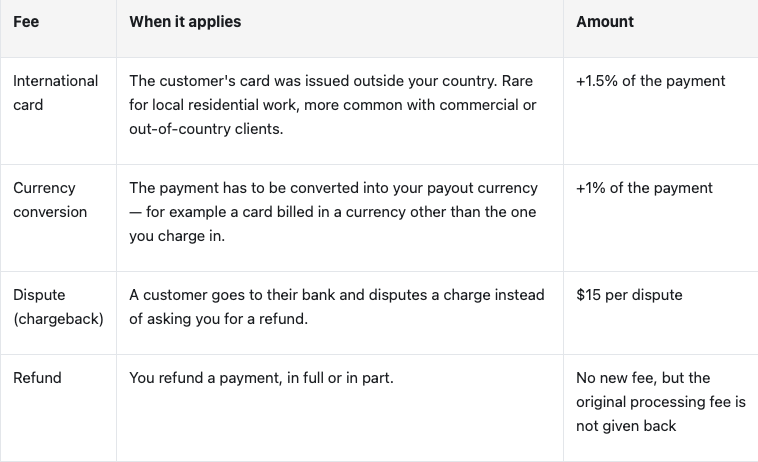
Fees That Only Apply Sometimes
How a dispute actually plays out
A dispute is not the same as a refund. The customer's bank pulls the money back out of your account while it investigates, and the $15 fee is charged the moment the dispute is opened.
If you win — the disputed amount comes back to you. The $15 fee for receiving the dispute does not.
If you lose — you are out the payment and the fee.
The cheapest dispute is the one that never happens. A clear business name on the customer's statement, signed-off job notes, before-and-after photos on the visit, and a refund issued quickly when something goes wrong all cut disputes down far more effectively than fighting them afterwards.
How the fee is taken
It comes out of the payout, not the invoice. A $200 Visa payment shows as paid in full at $200 in Rotor. $193.90 is what lands in your bank.
Once per successful charge. Declined and failed charges cost nothing, including the automatic retry on a failed billing cycle.
The percentage covers the whole amount charged — the work, tax, and any tip. A larger invoice means a larger fee.
The flat portion hurts small payments most. $0.30 on a $20 charge is 1.5% on its own. Batching several small jobs into one invoice — with a rollup billing cycle, for example — costs less in fees than charging each one separately.
Cash, cheque, and e-transfer are free. Payments you record manually never touch a card network, so there is no processing fee at all.
Things worth knowing
USD and CAD are charged at the same rates. Payouts are made in your own currency.
Saving a card on file, auto-pay, and billing cycle charges all use the same rates above — there is no extra charge for storing a card or for charging it automatically.
Fees are per transaction, not per invoice. Two part-payments on one invoice mean two flat fees.
Where these fees come from
Payments in Rotor are processed by Stripe. The rates on this page are what Rotor charges you, and they are the numbers to go by — Stripe publishes its own list prices, and ours are not always identical.
For background on how a payment method works, what a dispute involves, or why a bank payment takes a few days to clear, Stripe’s own documentation is the best place to read further:
If a fee on one of your payouts does not look right, contact Rotor support — we can look at the transaction with you.
Rates are subject to change. The rates, caps and fees on this page can change over time, and processing rates are set by the card networks and banks as well as by us. We update this page when they change, and the version published here is the one that applies.