Residuals & Clawbacks
Pay the seller on a service plan's later jobs with residual rates, and take Sales commission back when a plan cancels early.
Written By Noah Sanches
Last updated 7 days ago
Residuals pay the person who sold a service plan on the plan's later jobs, at a rate you choose. Clawbacks take part of their Sales commission back when the plan cancels early. Each has its own switch, and both are off by default. With both off, sellers are paid exactly as before.
Where: Financials → Payroll → Settings → Company Settings → Residuals and Clawbacks.
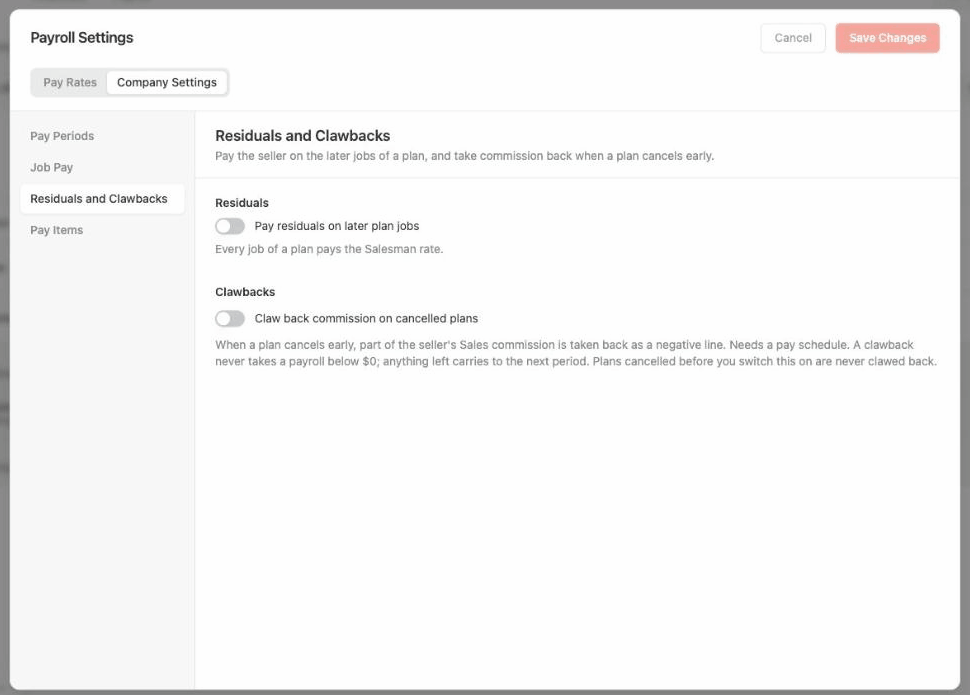
Residuals
Turn on Pay residuals on later plan jobs, then choose Residuals start from (the 2nd to 12th job, the 2nd by default).
Jobs before the start job pay the Salesman rate, shown as Sales.
The start job and every later job pay the Residual rate, shown as Residual.
The 1st job is always Sales.
Set residual rates
With residuals on, a Residuals tab appears in Pay Rates for the Salesman role and for anyone who holds it:
Residual: the rate on each later job. You can also set it by plan frequency.
After agreement: the rate on jobs after the plan's agreement ends. Leave it empty to keep using the Residual rate.
If no Residual rate is set, later jobs pay the regular Salesman rate. A 0% Residual or After agreement rate stops residuals entirely; no rule can raise it.
Example: a $180 item (after discount). Ava's Salesman rate is 10%, Residual 5%, After agreement 2%. Residuals start on the 2nd job.
Salesman rate rules also apply to residual rates.
If the seller is deactivated or removed, unpaid residual lines stop.
Auto-renewed plans have no seller, so they pay no Sales or Residual commission.
Paid lines never change when you turn residuals on or off.
Clawbacks
Turn on Claw back commission on cancelled plans. This needs a pay schedule (see New Payroll Guide).
When a plan is cancelled, Rotor takes back a percent of the Sales commission earned on the plan's first completed job. Pausing a plan, cancelling one job, refunds, and chargebacks don't trigger a clawback.
Clawback steps
Steps decide the percent. You can have 1 to 5, each turned on or off. If several match, the largest percent wins.
Defaults: 100% before job 2, 50% before job 3, and 25% before the agreement ends (off).
How a clawback is taken
A clawback is a negative line on payroll. It never takes a person below $0 in a pay period. Whatever is left carries into later periods.
Example: Ava earned $18 Sales commission and the plan cancels before job 2 (100%). In Oct 1–15 she has $10 of other pay, so the clawback line is −$10. In Oct 16–31 she has $5, so it's −$5. The last $3 carries forward.
Undoing a clawback
Customer saved: if the plan is made active again within the Save window (30 days by default, up to 90), the clawback is undone automatically. Anything already taken comes back as a Clawback reversal line.
Remove Clawback: click a clawback line on the Payroll page to open its details, then click Remove Clawback.
Good to know
Plans cancelled before you turned clawbacks on are never clawed back.
Residual and clawback lines appear under the Salesman commission filter. Clawbacks also have their own Clawback filter.
You can't remove your pay schedule while clawbacks are on.
Was this helpful?
Still need help? Ask the team